Hi, so in case you can't tell my ever-so-creative blog name, this blog is dedicated to Gravity Falls and other related stuff! :) This includes all the other cartoons I'm into (Wander Over Yonder, Star vs. the Forces of Evil, Wordgirl, Animaniacs and other shows that I'm probably forgetting) Please note that you are on my Wordpress site, and everything I post is imported from tumblr, so if something has transfered strangle, that's why. Reblogged posts (which are not mine!) will have giant quotation marks in front of the text, along with the username of original tumblr user who posted it in red text.
stop doing things in unison you adorable little jerKs
God dammit
A thing I love about Gravity Falls is the twins’ personalities are so distinct, you sometimes forget they’re twins. Yet at the same time they will often do ‘twin’ things like move or talk in unison. They’re their own characters yet they are also a set, and that healthy balance is a great characterization.
stop doing things in unison you adorable little jerKs
God dammit
A thing I love about Gravity Falls is the twins’ personalities are so distinct, you sometimes forget they’re twins. Yet at the same time they will often do ‘twin’ things like move or talk in unison. They’re their own characters yet they are also a set, and that healthy balance is a great characterization.
I have seen a lot of posts on here talking about individual extensions for chrome to help people, but I haven’t seen a place where they’re compiled together. So here you are!
Open Dyslexic: changes the font to Open Dyslexic and makes it larger. Personal favourite.
Dyslexie: changes the font to dyslexie and allows change to font size and colour (blue). Can be turned off. (Doesn’t seem to work on facebook)
Font Changer: Allows you to change the font on specific website or on everything using a Google Font. I believe you can also upload your own, if there’s a specific font you need.
BeeLine Reader: Uses a gradient so your eye follows along one line to the next
Sunglasses: Tints the screen grey to reduce contrast
Desaturate: Removes all colour and makes everything a greyscale
High Contrast: Change contrast or invert colour scheme
Deluminate: Similar to High Contrast, but tries to keep photos in tact
G.lux: Makes the colour of the display change depending on the time of day (also cuts down on blue light so it’s easier to fall asleep)
reduce visual distraction
Readability: Can change things such as margins, colours, etc… as well as reduce visual business
Ad Block Plus: blocks ads. What more needs to be said?
FlashControl: Stops flash animations running by themselves
Hide GIFS: Allows you to keep GIFS from displaying
Text Mode: Loads pages in black/white, covers images, with text only.
audio
SpeakIt!: Reads small section of highlighted text aloud
Chrome Speak: Reads small section of highlighted text aloud
Announcify: Reads full web pages. Warning: may stop in the middle of text or not read for the full thing.
tiny update: adblock plus was basically bought out by advertisers! if you want a reliable ad blocker now, i highly recommend the lovely ublock origin instead!!
^^^ i made the switch about a month ago. Highly recommend everyone do so.
I have seen a lot of posts on here talking about individual extensions for chrome to help people, but I haven’t seen a place where they’re compiled together. So here you are!
Open Dyslexic: changes the font to Open Dyslexic and makes it larger. Personal favourite.
Dyslexie: changes the font to dyslexie and allows change to font size and colour (blue). Can be turned off. (Doesn’t seem to work on facebook)
Font Changer: Allows you to change the font on specific website or on everything using a Google Font. I believe you can also upload your own, if there’s a specific font you need.
BeeLine Reader: Uses a gradient so your eye follows along one line to the next
Sunglasses: Tints the screen grey to reduce contrast
Desaturate: Removes all colour and makes everything a greyscale
High Contrast: Change contrast or invert colour scheme
Deluminate: Similar to High Contrast, but tries to keep photos in tact
G.lux: Makes the colour of the display change depending on the time of day (also cuts down on blue light so it’s easier to fall asleep)
reduce visual distraction
Readability: Can change things such as margins, colours, etc… as well as reduce visual business
Ad Block Plus: blocks ads. What more needs to be said?
FlashControl: Stops flash animations running by themselves
Hide GIFS: Allows you to keep GIFS from displaying
Text Mode: Loads pages in black/white, covers images, with text only.
audio
SpeakIt!: Reads small section of highlighted text aloud
Chrome Speak: Reads small section of highlighted text aloud
Announcify: Reads full web pages. Warning: may stop in the middle of text or not read for the full thing.
tiny update: adblock plus was basically bought out by advertisers! if you want a reliable ad blocker now, i highly recommend the lovely ublock origin instead!!
^^^ i made the switch about a month ago. Highly recommend everyone do so.
I’ve always wondered about the scale of these characters. It’s pretty obvious that Wander is very small and that Sylvia’s is much larger than him. But what are the exact numbers?
Let’s start with Wander
In this ask to Dave Thomas, Producer and Supervising Director of Wander Over Yonder, he says that Sylvia is 10 feet long from her snout to the tip of her tail.
So, this gives us a good base to start with. Luckily, I found a picture of her at her full length.
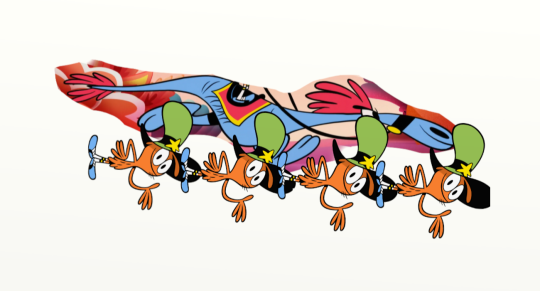
Using the power of editing, I could lay several Wanders across her.
It seems that Sylvia is about 4 Wanders long. Divide 10 ft by 4 and you get 2.5 ft.
So, Wander is 2 and a half feet tall.
We can use this number to determine Sylvia’s height as well. Sylvia’s height tends to fluctuate depending on what’s she doing but we’ll just measure her at her tallest.
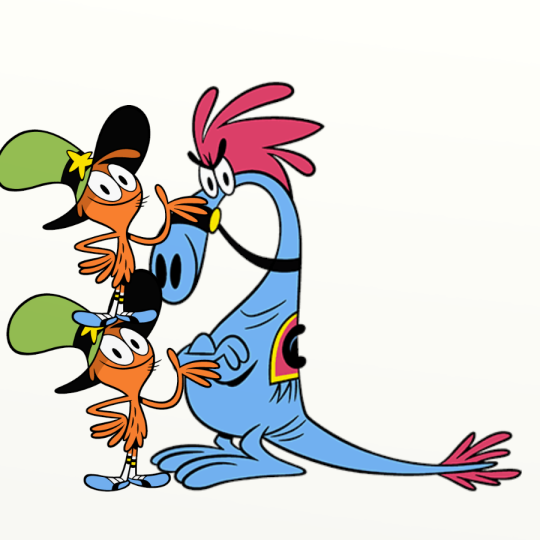
I stacked a couple Wanders up next to her and found that Sylvia is 2 Wanders tall. Multiply 2.5 ft times 2 and you get 5 ft.
Sylvia is 5 ft tall.
So, there you have it. I think it’s safe to assume that these are their approximate heights. The method of stacking Wander’s could also be used to measure other characters, as long as you have the scale of them first. What do you guys think?
I’ve always wondered about the scale of these characters. It’s pretty obvious that Wander is very small and that Sylvia’s is much larger than him. But what are the exact numbers?
Let’s start with Wander
In this ask to Dave Thomas, Producer and Supervising Director of Wander Over Yonder, he says that Sylvia is 10 feet long from her snout to the tip of her tail.
So, this gives us a good base to start with. Luckily, I found a picture of her at her full length.
Using the power of editing, I could lay several Wanders across her.
It seems that Sylvia is about 4 Wanders long. Divide 10 ft by 4 and you get 2.5 ft.
So, Wander is 2 and a half feet tall.
We can use this number to determine Sylvia’s height as well. Sylvia’s height tends to fluctuate depending on what’s she doing but we’ll just measure her at her tallest.
I stacked a couple Wanders up next to her and found that Sylvia is 2 Wanders tall. Multiply 2.5 ft times 2 and you get 5 ft.
Sylvia is 5 ft tall.
So, there you have it. I think it’s safe to assume that these are their approximate heights. The method of stacking Wander’s could also be used to measure other characters, as long as you have the scale of them first. What do you guys think?


 Gravity Falls and Other Related Stuff